Troubleshooting Fabric Data Pipeline InternalServerError: A Missing Microsoft.Storage Service Endpoint
Copy pipeline via Virtual Network Data Gateway failing with LakehouseOperationFailed / InternalServerError at the _delta_log commit step? The fix is a single Azure subnet configuration change.
Copy pipeline via Virtual Network Data Gateway failing with LakehouseOperationFailed / InternalServerError at the _delta_log commit step? The fix is a single Azure subnet configuration change.
#Problem Statement
We were building a Microsoft Fabric Data Pipeline to copy data from an Azure Database for PostgreSQL hosted inside a private Virtual Network (VNet) into a Microsoft Fabric Lakehouse Delta table.
Since the PostgreSQL server was not publicly accessible, connectivity was established through a Virtual Network Data Gateway (VNDG).
The setup looked healthy:
- The Virtual Network Data Gateway was online
- The PostgreSQL connection test succeeded
- Data preview returned records successfully
However, when executing the pipeline, it consistently failed after approximately ~1 hour while processing around 1.5 million rows, with the following error:
Failure happened on 'destination' side.
ErrorCode=LakehouseOperationFailed
Message=Lakehouse operation failed for: Operation returned an invalid status code 'InternalServerError'.
Path: '.../Tables/schema_name/table_name/_delta_log/83a16879...tmp'
Message: 'Internal Server Error'
The failure was always on the destination side at the _delta_log commit step — the very last operation before the Delta table write completes.
#Gateway and Connectivity Validation
We verified that:
- The Virtual Network Data Gateway was online
- The PostgreSQL connection test succeeded
- Data preview returned records correctly
- The source system was reachable through the gateway
From a connectivity perspective, everything appeared to be working as expected.
#The Root Cause
The key insight: the Virtual Network Data Gateway is the integration runtime for the entire copy activity — including the write to OneLake/Lakehouse. It's not just a proxy for the source read.
The VDG runs inside your delegated VNet subnet and needs network-level access to Azure Storage (which backs OneLake) in order to write the Delta files.
Without the correct Service Endpoint on the VDG subnet, traffic from the VDG to Azure Storage was either blocked or routed incorrectly — causing the InternalServerError during the Delta log commit.
#The Fix
Add the Microsoft.Storage service endpoint to the delegated subnet used by your Virtual Network Data Gateway.
Steps in Azure Portal:
- Navigate to Virtual Network → Subnets → select the subnet delegated to
Microsoft.PowerPlatform/vnetaccesslinks - Under Service endpoints, click Add
- Select Microsoft.Storage from the service dropdown
- Select the regions (include your Fabric capacity region — e.g., West Europe)
- Click Save
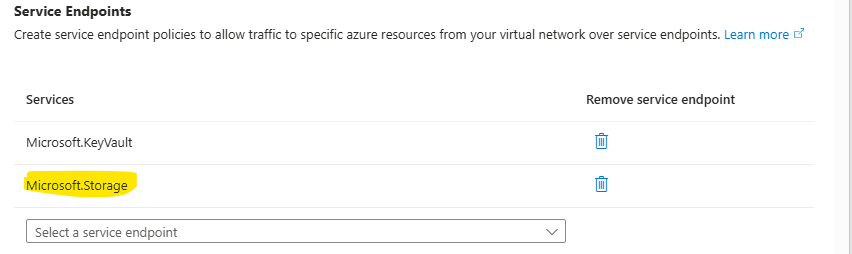
No gateway restart or pipeline reconfiguration required — the next pipeline run succeeded immediately.
#Key Takeaways
- The VDG writes to the destination — it is the full integration runtime, not just a source proxy
- A missing
Microsoft.Storageservice endpoint on the VDG subnet causes silent failures at the Delta log commit stage - The error appears on the destination side even though the root cause is a network configuration issue on the VDG subnet
- If your Fabric copy pipeline via VDG fails with
LakehouseOperationFailed/InternalServerErrorat the_delta_logpath — check your subnet service endpoints first
Get future articles
Follow for practical Microsoft Fabric, Azure, Spark, and data engineering writeups.